Workflow Management Software for Accountants: A Complete Guide
Running an accounting practice involves more than preparing tax returns and maintaining financial records. Accountants must manage client requests, allocate responsibilities, monitor deadlines, review documents and keep clients informed throughout the year.
When these activities are handled through separate spreadsheets, emails and manual reminders, important information can become difficult to track.
Workflow management software for accountants helps bring these activities into one organised system. It gives accounting firms a structured way to manage recurring work, assign tasks, monitor progress and coordinate communication between team members.
As accounting practices take on more clients and handle increasingly complex compliance requirements, having a consistent workflow becomes important.
The right software can reduce administrative pressure, improve visibility across ongoing work and help accountants spend more time on professional services.
This guide explains how accounting workflow management works, which features matter, and how firms can introduce better processes into their daily operations.
What Is Workflow Management Software for Accountants?
Workflow management software for accountants is a digital system that helps accounting firms organise, assign and monitor their operational activities. It provides a central place to manage tasks, client information, internal processes and important deadlines.
Rather than relying on individual employees to remember every responsibility, firms can establish repeatable workflows that explain what needs to happen, who is responsible and when each activity should be completed.
For example, onboarding a new client may involve several stages:
- Collecting client information and identification documents.
- Completing client verification and AML checks.
- Preparing an engagement letter.
- Setting up the client profile.
- Recording relevant tax and filing deadlines.
- Assigning ongoing responsibilities to the appropriate team members.
A workflow management system can organise these stages into a consistent process. Team members can see their assigned responsibilities, while managers can monitor the overall progress.
The objective is not simply to automate tasks. It is to create a reliable operating structure that supports the entire accounting practice.
Why Do Accounting Firms Need Workflow Management Software?
Accounting practices often handle multiple clients with different reporting periods, tax obligations and service requirements. Without a structured system, managing these responsibilities can create operational difficulties.
Here are some common challenges that workflow management software can help address.
1. Managing Multiple Client Deadlines
Accountants work with several statutory and internal deadlines, including VAT returns, payroll submissions, Corporation Tax and Self Assessment. Missing a deadline can create additional work and potentially expose clients to penalties.
A centralised workflow system helps firms record important dates, assign responsibilities and monitor outstanding work.
For example, an accounting firm can create recurring tasks for VAT return preparation. Each task can include a responsible employee, an internal completion date and a review stage.
This approach gives managers greater visibility of upcoming work and reduces dependence on individual reminders.
2. Reducing Manual Administrative Work
Many accounting practices still use spreadsheets, email threads and separate task lists to manage everyday activities. Employees may need to update several systems whenever a task changes.
Workflow management software brings related activities together. Depending on the platform, firms can automate task creation, recurring reminders, status updates and internal notifications.
This reduces repetitive administration and gives employees more time to focus on accounting work.
3. Improving Team Collaboration
Accounting work often involves several employees. One person may collect client documents, another may prepare accounts, and a senior accountant may complete the final review.
Without clear task ownership, responsibilities can overlap or become unclear.
A workflow management system allows managers to allocate work and establish clear stages. Team members can check task progress, communicate updates and identify activities waiting for approval.
4. Maintaining Better Client Communication
Clients frequently contact accountants to ask about outstanding documents, filing progress and upcoming obligations.
When communication is spread across different email conversations, employees may struggle to find previous updates.
A centralised client management system can help organise client information, communication history and outstanding requests.
Some platforms also provide client portals where customers can share documents and access relevant information.
5. Improving Visibility Across the Practice
Practice managers need to understand how work is progressing across the entire firm.
They may need to identify:
- Which client assignments are overdue?
- Which employees have too many outstanding tasks?
- Which accounts are waiting for review?
- Which client documents have not been received?
- Which deadlines are approaching?
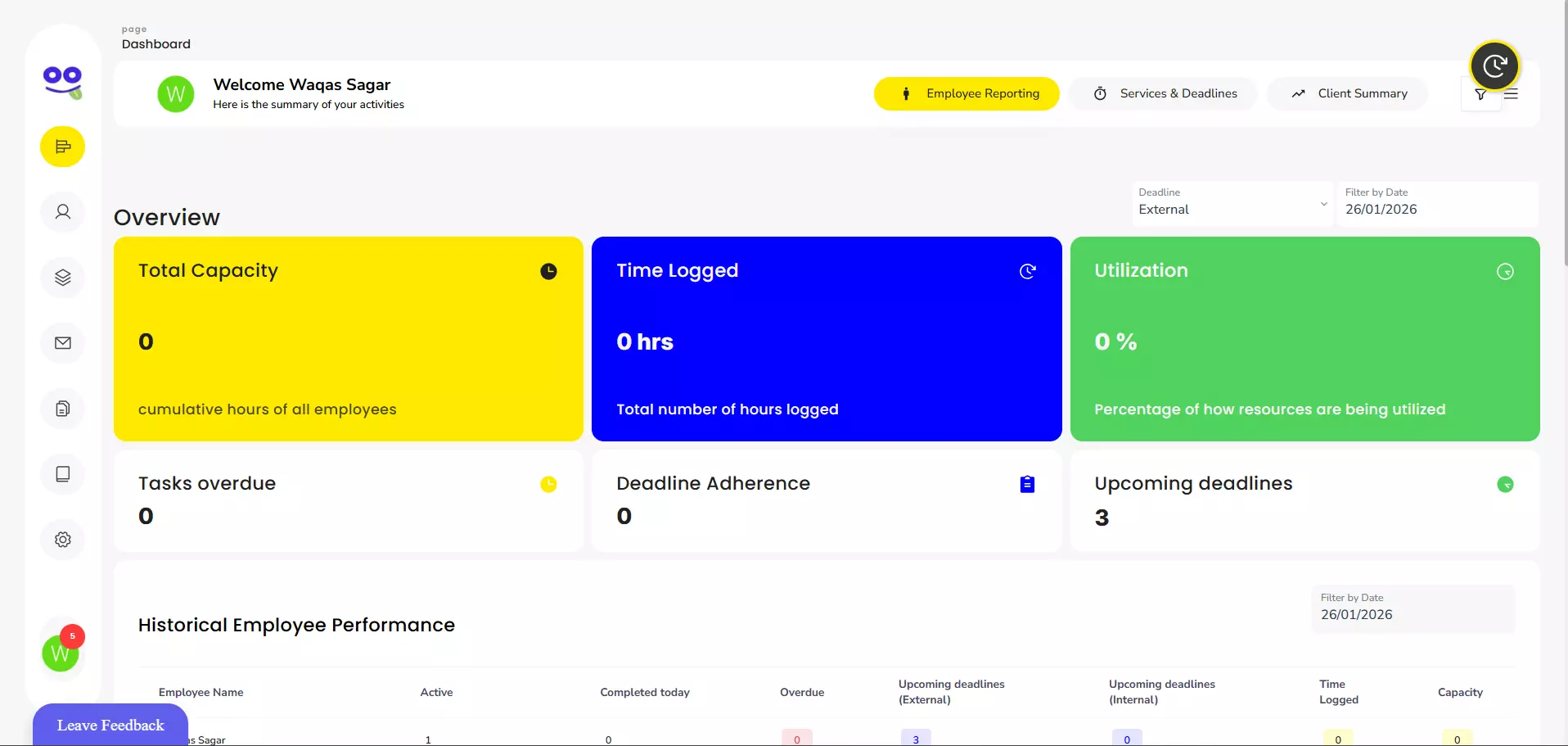
Workflow management software provides dashboards and reporting features that help managers answer these questions without checking individual spreadsheets.
Essential Features to Look for in Accounting Workflow Management Software
Not every task management platform is designed for accounting practices. Accountants should consider features that support their specific operational requirements.
The following capabilities are particularly useful.
1. Task Management and Assignment
Task management is one of the most important features of workflow management software for accountants.
A suitable platform should allow managers to:
- Create tasks for individual clients.
- Assign work to specific employees.
- Set deadlines and priorities.
- Add task descriptions and supporting information.
- Monitor progress through different statuses.
- Track completed and outstanding activities.
For example, a manager could create a year-end accounts workflow with separate tasks for document collection, bookkeeping, accounts preparation, review and final submission.
2. Workflow Automation
Automation helps accounting firms reduce repetitive administrative activities.
Instead of creating every task manually, firms can establish templates for recurring services and standard processes.
Examples include:
- Automatically generating monthly bookkeeping tasks.
- Creating annual accounts preparation workflows.
- Scheduling recurring payroll activities.
- Sending reminders for outstanding client documents.
- Notifying managers when tasks require approval.
Automation should support the firm's existing procedures rather than introduce unnecessary complexity.
3. Client Management and Centralised Records
Accounting practices need reliable access to client details and service information.
A client management feature can help employees organise contact details, assigned services, communication records and relevant documents.
Having this information in one place makes it easier for authorised team members to understand a client's requirements and continue work without repeatedly requesting the same information.
4. Deadline and Reminder Management
Accounting work is deadline-driven. A missed internal review date can affect the firm's ability to meet a statutory filing deadline.
Look for software that supports:
- Custom task deadlines.
- Automated reminders.
- Recurring schedules.
- Overdue task notifications.
- Deadline monitoring.
- Internal escalation procedures.
It is also useful to distinguish internal completion dates from official filing deadlines. Firms should leave sufficient time for checking, client approval and submission.
5. Document Management and Client Portals
Document collection is a regular part of accounting work.
Accountants request bank statements, invoices, receipts, payroll information and other supporting records. A secure document-sharing process can make this easier for both clients and employees.
A client portal can provide a central location for exchanging documents and tracking outstanding requests.
Firms should also assess access permissions, encryption, backup arrangements and document retention policies before selecting a platform.
6. Reporting and Performance Tracking
Reporting features help practice managers understand workload distribution and operational performance.
Useful reports may include:
- Tasks completed during a selected period.
- Outstanding and overdue assignments.
- Employee workload.
- Client service progress.
- Average task completion times.
- Recurring operational bottlenecks.
These insights can help managers identify where additional resources, training or process improvements may be required.
7. Integrations With Existing Accounting Tools
Accounting practices often use separate applications for bookkeeping, payroll, tax preparation, document storage and communication.
Software integrations can reduce duplicate data entry and improve information flow between systems.
Before choosing a platform, check whether it supports the applications your team already uses. Also consider whether the integration transfers information automatically or requires manual intervention.
How Workflow Management Software Improves Everyday Accounting Processes
Understanding practical applications is often more useful than looking at a feature list. Different accounting services require different workflows.
Here are some examples of how firms can organise their operations.
Bookkeeping Workflow
A bookkeeping process may involve collecting financial records, categorising transactions, reconciling accounts and preparing reports.
A structured workflow could follow these stages:
- Create a monthly bookkeeping task.
- Request bank statements and supporting documents.
- Record received documents.
- Assign transaction categorisation and reconciliation.
- Review the completed bookkeeping work.
- Prepare financial reports.
- Notify the client when the work is complete.
The workflow makes responsibilities clearer and helps employees identify missing information before completing the assignment.
VAT Return Workflow
VAT return preparation involves several activities that need to be completed accurately and on time.
An accounting firm could organise the process into the following stages:
- Identify the client's VAT accounting period.
- Request relevant financial records.
- Check sales and purchase transactions.
- Review VAT treatment and supporting evidence.
- Prepare the VAT return.
- Complete the internal review.
- Obtain approval where required.
- Submit the return and record its completion.
A workflow system can help managers monitor each stage and identify returns that are waiting for client information or internal approval.
Payroll Processing Workflow
Payroll requires regular coordination between clients and accounting staff.
A monthly payroll workflow may include:
- Requesting employee changes and timesheets.
- Checking new starters and leavers.
- Reviewing salary adjustments and deductions.
- Calculating payroll.
- Reviewing payroll figures.
- Preparing payslips.
- Completing the relevant submissions.
- Recording payroll completion.
Recurring task templates help firms maintain a consistent process each pay period.
Year-End Accounts Preparation
Year-end accounts preparation usually requires information from several sources.
A structured process can help an accounting team manage:
- Client document collection.
- Bank and control account reconciliations.
- Review of income and expenses.
- Adjustments and year-end journals.
- Preparation of financial statements.
- Senior accountant review.
- Client approval.
- Final filing and record keeping.
Separating these activities into individual tasks makes it easier to monitor progress and identify delays.
Workflow Management and Making Tax Digital: What Accounting Firms Should Consider
The introduction of Making Tax Digital (MTD) creates additional operational considerations for UK accounting practices.
Accountants need to coordinate digital record keeping, quarterly updates, client authorisations and tax return preparation. These responsibilities make organised internal processes increasingly important.
HMRC explains that agents and their clients must use compatible software to maintain digital records and submit the required information under Making Tax Digital for Income Tax.
For accounting practices, this means reviewing how responsibilities are distributed between accountants, bookkeepers and clients.
Workflow management software can support this process by helping firms:
- Identify clients who need additional support.
- Assign responsibilities for record collection.
- Track quarterly preparation activities.
- Monitor outstanding client information.
- Coordinate internal reviews.
- Record progress towards submission deadlines.
It is important to understand that workflow management software is not necessarily MTD-compatible tax software. A practice management platform can organise operational activities, while separate compatible software handles digital records and HMRC submissions.
For official information, accountants can consult the HMRC guidance on preparing your accounting practice for Making Tax Digital.
How to Choose the Right Workflow Management Software for Your Accounting Practice
Choosing software requires more than comparing feature lists. A platform should match the firm's size, working processes, client requirements and existing technology.
Consider the following factors before making a decision.
Understand Your Current Workflow Problems
Start by identifying the processes that create the most administrative pressure.
For example:
- Are employees struggling to track assigned tasks?
- Do managers frequently chase staff for updates?
- Are clients regularly submitting documents late?
- Are recurring tasks created manually?
- Is it difficult to identify overdue assignments?
Understanding these problems helps you identify which software capabilities are genuinely necessary.
Consider the Size of Your Accounting Firm
A small accountancy practice may only need straightforward task management, recurring reminders and client records.
A larger firm may require additional capabilities, such as advanced reporting, role-based permissions, workload management and integrations.
Choose software that supports your current requirements while allowing the practice to expand without completely changing its systems.
Evaluate Ease of Use
Introducing a new platform should make daily operations easier.
If employees find the software difficult to navigate, they may continue using spreadsheets and email for routine activities.
Look for an intuitive interface, straightforward task creation, clear dashboards and accessible training resources.
Check Data Security and Permissions
Accounting practices handle confidential financial and personal information.
Before adopting new software, review:
- User access controls.
- Data encryption.
- Backup and recovery arrangements.
- Multi-factor authentication.
- Data retention policies.
- Supplier security practices.
- Data processing agreements.
UK firms should also consider their obligations under applicable data protection legislation, including the UK GDPR and Data Protection Act 2018.
Compare Pricing and Available Support
Software costs can vary according to the number of users, active clients, features and subscription arrangements.
Compare the total cost rather than focusing only on the advertised monthly price.
Also assess whether the provider offers onboarding assistance, technical support, training and useful product documentation.
Common Workflow Management Mistakes Accounting Firms Should Avoid
Software alone cannot resolve inefficient business processes. Accounting firms should also establish clear procedures for using their chosen platform.
Creating Unnecessary Tasks
Adding too many tasks can make the system difficult to manage.
Create tasks that represent meaningful activities or responsibilities. Combine minor administrative actions where appropriate.
Not Defining Task Ownership
Every important task should have a clearly identified owner.
When several employees assume that someone else is responsible, work can remain incomplete.
Assign one accountable person to each task, even when multiple employees contribute.
Ignoring Workflow Templates
Repeatedly creating similar tasks manually increases administrative effort.
Use standard templates for recurring services such as payroll, VAT returns, bookkeeping and annual accounts.
Review templates regularly to ensure they reflect current processes.
Failing to Train Employees
Employees need to understand how to create tasks, update statuses, record progress and communicate through the platform.
Provide practical training and establish consistent procedures for using the system.
Treating Automation as a Replacement for Professional Review
Automation can organise tasks and trigger reminders, but it does not replace an accountant's professional judgement.
Financial information, tax calculations and statutory submissions still require appropriate checks and authorisation.
How Remindoo Supports Workflow Management for Accounting Practices
Accounting firms need a practical way to coordinate client work, manage recurring responsibilities and maintain visibility across their operations.
Remindoo is designed for accounting practices that want to organise their daily operations through a centralised practice management platform.
Its features support several areas of accounting practice management.
Client Management
Remindoo provides client management capabilities that help accounting practices organise client information and manage ongoing relationships.
A centralised approach makes it easier for authorised employees to access relevant client details when handling assignments.
Workflow and Task Management
Accounting teams need to know what work is outstanding and who is responsible for completing it.
Remindoo supports workflow organisation and task management, helping firms coordinate responsibilities and monitor ongoing work.
Email Triage and AI Summaries
Accountants receive regular emails containing client queries, document requests and operational updates.
Email triage and AI-powered summaries can help employees organise incoming communications and understand important information more efficiently.
These capabilities can support communication management, although employees should review important information before taking action.
Client Portal
A client portal provides a more structured way to exchange information between accounting firms and their clients.
It can help reduce reliance on scattered email attachments and support a more organised document-sharing process.
Proposals and AML
Client onboarding involves more than creating a contact record.
Accounting practices also need to manage engagement proposals and appropriate anti-money laundering checks.
Remindoo includes proposals and AML-related capabilities to support these onboarding activities.
Analytics and Practice Visibility
Managers need to understand how work is progressing across the practice.
Analytics can help provide operational visibility and support better decisions about task allocation, workloads and ongoing activities.
The most effective way to evaluate any practice management platform is to assess its features against your actual working processes.
You can explore Remindoo to learn more about its practice management capabilities.
Frequently Asked Questions
What is the best workflow management software for accountants?
The best workflow management software depends on the firm's size, services and operational requirements. Accounting practices should look for task management, workflow automation, client management, deadline tracking, reporting and integrations.
How does workflow management software help accountants?
It helps accountants organise client work, assign responsibilities, monitor deadlines and track task progress. It can also reduce repetitive administration through recurring tasks, reminders and workflow automation.
Can small accounting firms benefit from workflow management software?
Yes. Small accounting practices can use workflow management software to establish consistent processes, organise client assignments and manage deadlines without relying entirely on spreadsheets and manual reminders.
Can accounting workflow software automate recurring tasks?
Many platforms support recurring tasks and workflow templates. These features allow firms to schedule regular activities, such as bookkeeping, payroll processing and VAT return preparation.
Is workflow management software the same as accounting software?
No. Accounting software primarily handles financial activities such as bookkeeping, invoicing, bank reconciliation and tax calculations. Workflow management software focuses on organising tasks, employees, client work and operational processes. Some practice management platforms integrate with accounting applications.
Does workflow management software help with Making Tax Digital?
It can help accounting firms organise MTD-related responsibilities, including client preparation, document collection, task allocation and internal reviews. However, workflow management software does not automatically provide MTD-compatible record keeping or HMRC submission functionality.
What should accountants consider before choosing workflow management software?
Accountants should evaluate task management, automation, client records, security, reporting, integrations, ease of use and pricing. The platform should support existing accounting processes rather than create additional administrative work.
Conclusion
Managing an accounting practice requires coordination between employees, clients, documents and deadlines. When these activities are handled through disconnected systems, it becomes harder to maintain visibility and consistent working procedures.
Workflow management software for accountants provides a structured approach to organising these responsibilities. Features such as task allocation, recurring workflows, deadline reminders, client management and reporting can help accounting firms improve operational control.
However, successful implementation also depends on clear responsibilities, suitable processes and employee adoption.
Platforms such as Remindoo bring several practice management capabilities together, giving accounting firms an option to organise client work and everyday operations within a centralised environment.
For accounting practices looking to improve their internal processes, reviewing existing workflows is a sensible first step towards choosing the right software.