Video Conferencing App Development: Everything You Need to Know
In the modern world, video conferencing has become a vital tool for businesses, educational institutions, healthcare providers, and social interactions. With the shift to remote work and virtual collaboration, the demand for video conferencing apps has surged.
Whether you're looking to develop a solution for your organization or create an app to cater to the growing global market, understanding the ins and outs of video conferencing app development is essential.
1. Understanding the Key Features of a Video Conferencing App
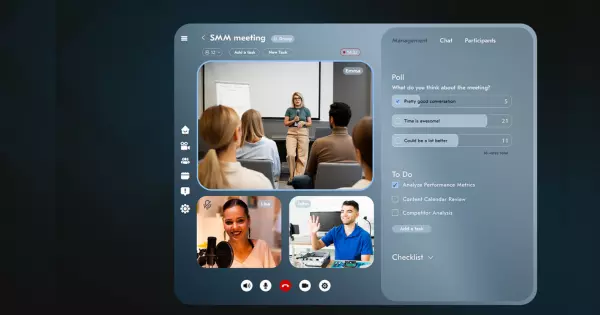
Before diving into the technical aspects of video conferencing app development, it's crucial to understand the core features your app will need. These features are vital for ensuring that your app is functional, user-friendly, and competitive in the market.
Real-Time Video and Audio Communication
The most essential feature of any video conferencing app is high-quality video and audio communication. Users expect smooth, clear, and real-time interaction. Low latency is crucial, so users don’t experience delays or interruptions during calls.
Screen Sharing
Screen sharing is another critical feature, especially for business meetings, educational purposes, and presentations. It allows users to share their desktops or specific applications in real-time, promoting collaboration during meetings.
Text Messaging and Chat
Providing a chat function for sending text messages during calls is a key feature. It allows participants to communicate without interrupting the flow of conversation and is especially useful for sharing links, notes, or files.
Recording Functionality
The ability to record meetings or sessions is increasingly important. Whether for legal compliance, business records, or educational purposes, providing an option to record video conferences is a must-have for many users.
Virtual Backgrounds and Filters
Virtual backgrounds and filters have become popular features in the video conferencing space, especially for remote workers and social interactions. They allow users to customize their environment during meetings, adding a layer of personalization and fun.
Security and Encryption
Video conferencing apps often deal with sensitive information, so ensuring robust security and encryption is non-negotiable. Features like end-to-end encryption, two-factor authentication, and secure access controls help protect users' data and privacy.
2. Choosing the Right Technology Stack
Choosing the right technology stack is crucial for building a reliable and scalable video conferencing app. Here's a breakdown of the essential technologies that will support your app’s development.
WebRTC (Web Real-Time Communication)
WebRTC is an open-source technology that enables real-time communication in browsers and mobile apps. It is the core technology behind most video conferencing apps, providing peer-to-peer communication for audio, video, and data sharing. By using WebRTC, you can ensure low-latency communication and high-quality media sharing.
Backend Frameworks
For the backend, you'll need a framework that can handle real-time data processing and large volumes of user interactions. Popular choices include:
- Node.js: Ideal for handling concurrent connections and real-time data.
- Django (Python): Known for its simplicity and scalability.
- Ruby on Rails: Great for rapid development and maintaining a clean codebase.
Video and Audio APIs
Video conferencing apps rely heavily on video and audio APIs to manage media streaming. Some of the best API providers include:
- Agora: Provides high-quality, low-latency video calls.
- Twilio: Offers APIs for voice, video, and messaging.
- Daily.co: A modern API for real-time video and audio streaming.
Frontend Technologies
To build a responsive and interactive user interface, frontend technologies like React, Vue.js, or Angular are commonly used. These frameworks enable the development of dynamic user interfaces that work seamlessly across devices and platforms.
Cloud Infrastructure
Most video conferencing apps rely on cloud infrastructure for scalability and performance. Cloud services like AWS, Google Cloud, or Microsoft Azure allow you to deploy your app’s backend and media servers, ensuring that you can easily scale up as your user base grows.
3. Building a Scalable Infrastructure
A video conferencing app must be able to handle thousands, if not millions, of users. To build an app that can scale effectively, you need a strong infrastructure.
Load Balancing
Distributing traffic across servers is essential with load balancing. As your user base grows, you must ensure that your app can handle spikes in traffic without affecting performance. Load balancing helps direct user requests to the least busy servers, ensuring smooth performance.
Content Delivery Network (CDN)
A CDN helps deliver content (like video and audio) more efficiently by distributing it across a global network of servers. By using a CDN, you can reduce latency and improve streaming performance, especially for users in different geographic locations.
Real-Time Data Processing
Real-time data processing is vital for a video conferencing app, as it ensures that audio and video streams are processed with minimal delay. Use technologies like Kafka, Redis, and WebSockets to process data in real-time, ensuring a seamless experience for users.
4. User Interface and User Experience Design
The design of your video conferencing app is crucial for its success. A clean, intuitive, and easy-to-navigate interface will ensure that users have a positive experience and return to your app time and again.
Simplicity
The interface should be clean and straightforward. Users should be able to start a call, join a meeting, or share their screen with minimal clicks.
Cross-Platform Compatibility
Your app should work seamlessly across multiple platforms, including desktop and mobile devices. Make sure the UI is responsive and adapts well to different screen sizes.
Accessibility
Accessibility is an essential part of any modern app. Consider users with disabilities and ensure that your app is easy to navigate with keyboard shortcuts, screen readers, and other assistive technologies.
5. Ensuring Security and Compliance
Given the sensitive nature of video conferencing, security is a critical aspect of development. Here are some security measures you should consider:
End-to-End Encryption
End-to-end encryption ensures that only meeting participants can access the video and audio data, keeping the conversation private.
Two-Factor Authentication (2FA)
Implementing 2FA will add an extra layer of security during user login, helping to prevent unauthorized access to sensitive meetings.
Data Compliance
If your app is used in industries like healthcare, finance, or education, make sure you comply with data protection regulations such as GDPR, HIPAA, and CCPA.
Read: The Benefits of WebRTC App Development for Remote
6. Testing and Quality Assurance
Thorough testing is essential to ensure that your video conferencing app performs optimally across all devices and network conditions.
Performance Testing
Test how your app performs under varying loads. Ensure that video and audio quality remain high even when multiple users are in a meeting or during peak traffic periods.
Compatibility Testing
Ensure that your app works across all major platforms, including Android, iOS, Windows, and Mac, as well as with various browsers (Chrome, Firefox, Safari).
Security Testing
Conduct regular security audits to identify and address vulnerabilities that could compromise user privacy.
7. Monetization Strategies
Once your video conferencing app is built, you’ll want to explore ways to monetize it. Here are a few common strategies:
- Freemium Model: Offer basic features for free and charge for premium features like additional meeting time, advanced collaboration tools, or cloud storage.
- Subscription Model: Charge users a recurring fee for access to premium features or unlimited meetings.
- Pay-per-Use: Offer a pay-per-use model for businesses that need video conferencing for specific occasions.
- Ad-Supported: Allow free access to your app but display advertisements to generate revenue.
Conclusion
Developing a video conferencing app requires a strategic approach, from choosing the right technology stack to ensuring the app is secure and scalable.
By incorporating the features and technologies discussed in this guide, you can build an app that meets the needs of users and stands out in a competitive market. If you're ready to develop your own video conferencing solution, make sure to partner with an experienced development team that can help bring your vision to life.
Start building your video conferencing app today! Reach out to discuss how we can help you create a secure, high-performance app that enhances collaboration and communication across the globe.