The Best Way to Use a JSON Validator Online for Accurate and Clean Data
In the world of digital development, especially in web and software environments, using structured data formats like JSON (JavaScript Object Notation) is now a standard. JSON makes it easier for systems to exchange and understand data. However, even a small error in JSON syntax can cause major issues during data transmission or while integrating APIs. This is where a JSON validator online becomes extremely useful.
If you're dealing with APIs, configuration files, or any kind of structured data, tools like a JSON Validator & Formatter are your best friends. Let’s understand why tools such as those offered by jParse are crucial for both developers and non-technical users who want to ensure their data is correct.
Why JSON Validation Matters
Before we look at tools, let's talk about the real need for JSON validation.
When you're working with JSON:
- A missing comma can break your entire script.
- An unclosed bracket can cause system errors.
- Improper nesting of keys and values can lead to incorrect data output.
- Invalid characters might result in complete data loss.
Manually checking for these mistakes is time-consuming and often unreliable. That’s why using a json validator online is a smart solution. It instantly checks your JSON code and highlights exactly where you went wrong, saving hours of debugging.
What Is a JSON Validator?
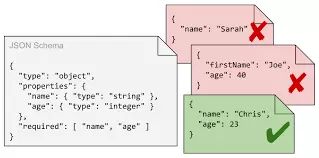
A JSON validator is a tool that checks whether your JSON data is formatted correctly. It checks the structure, syntax, brackets, commas, and everything in between. If it finds an error, it will show you the location and nature of the issue.
Online tools like jParse’s JSON Validator & Formatter are designed to help you:
- Detect syntax errors instantly
- Format the code for easy readability
- Copy and paste valid JSON for immediate use
These tools are not only helpful for programmers but also for content managers, marketers, and data analysts working with structured data.
What Is a JSON Formatter?
A JSON formatter is slightly different from a validator. While a validator checks if your JSON is correct, a formatter cleans it up for readability. Raw JSON often comes in a compressed, single-line format. This can be difficult to read or debug.
A json formatter and validator like the one on jParse lets you do both in one place. You can validate your JSON, and once it's confirmed to be correct, the tool automatically formats it into a neatly indented layout, making it easy to read and understand.
Key Features You Should Look for in a JSON Validator Tool
When choosing the right tool, especially for professional or repeated use, there are some features you should not compromise on:
- Real-time validation: The tool should give you results as soon as you paste or type JSON.
- Clear error messages: Instead of generic errors, the tool must point to the exact location and problem.
- One-click formatting: After validating, it should provide clean, readable JSON code.
- Support for complex structures: Whether your JSON is nested or flat, the tool should handle it with ease.
The json formatter validator tool at jParse checks all these boxes. It is fast, reliable, and free to use.
How to Use jParse’s JSON Validator Online
Here’s a simple step-by-step guide to using jParse's free validator tool:
- Copy your JSON code.
- Visit jParse.
- Paste your code into the input area.
- Click on “Validate JSON”.
- Instantly see if there are any errors.
- If the code is valid, use the "Format JSON" button to clean it up.
- Copy the corrected JSON and use it wherever needed.
The process is simple, fast, and user-friendly. You don’t need to install anything or create an account.
Common JSON Errors the Tool Can Fix
A json validator online tool helps you identify errors like:
- Missing commas between elements
- Extra commas at the end of an array or object
- Mismatched brackets (square or curly)
- Incorrect data types, such as using a number in quotes
- Unquoted keys (in JSON, keys must be in double quotes)
- Escape character errors, especially in large JSON strings
Instead of going through these manually, the tool at jParse highlights them clearly so you can fix them quickly.
Why Use a JSON Tool from jParse?
Here’s why jParse stands out in the world of online JSON utilities:
- Fast results: No loading delays, even with large JSON files.
- Mobile responsive: Validate JSON on the go using your mobile browser.
- Secure: Your data is not stored or shared.
- Simple design: Clean and distraction-free interface.
- All-in-one: Validate and format JSON with one tool.
Whether you are a developer, tester, or data analyst, jParse helps you reduce errors and improve data quality with its json formatter and validator.
Use Cases: Who Needs JSON Validation?
Let’s look at who can benefit the most from a json validator online:
- Front-End Developers: Check API response structures during UI development.
- Back-End Developers: Ensure server responses and configurations are valid.
- App Developers: Validate structured data for mobile apps.
- Technical Writers: Ensure documentation examples are accurate.
- QA Testers: Validate test data during integration testing.
- Data Analysts: Use clean JSON data for processing and transformation.
Clean data is the foundation of strong software. That’s why using tools like jParse’s JSON Validator & Formatter is now more important than ever.
Benefits of Using a JSON Formatter
Here are some real advantages of using a json formatter validator:
- Improves data readability
- Makes debugging easier
- Highlights missing or wrong brackets
- Saves time in error tracking
- Makes code collaboration easier
Formatted JSON is not only easy to understand but also helps in sharing and team collaboration. Whether it’s documentation or a live project, clean code matters.
Among all tools available, jParse has proven itself to be both effective and reliable. It’s a dedicated tool that focuses on
jParse – Your Go-To for JSON Formatting and Validation
helping developers and users fix and improve their JSON data in real-time.
With jParse’s free tool, you can:
- Fix any errors with a few clicks
- Get beautifully formatted JSON instantly
- Ensure the data you are sharing or storing is accurate
- Boost your workflow with faster debugging and testing
Using the jParse json formatter and validator is like having a second pair of eyes to review your data, but faster and always available.
Final Thoughts
Whether you're a beginner or an expert developer, one thing is clear — using a json validator online is no longer optional. It’s an essential step to ensure your data is accurate, readable, and ready for integration. And when it comes to reliable tools, jParse delivers everything you need in one simple interface.
From catching syntax errors to cleaning up messy code, the jParse JSON Validator & Formatter helps make your work easier and more efficient.
If you're serious about keeping your data clean and your code error-free, make jParse your first choice. Whether it’s for quick fixes or daily development, this json formatter validator is your dependable companion.