What Are Smart Digital Locks & How Do They Work?
Security is crucial in the world of today and this is even more in the tech driven world. A smart digital lock is one of the most reliable innovations in securing homes, offices, and other properties. The days of traditional keys being used as the standard key to locking doors have gone. Instead, smart locks offer a more advanced, secure, and convenient way to protect your premises.
Whether you’re upgrading your security system or looking to adopt a modern solution, understanding how these smart digital lock work is key.
This guide will explore what smart locks are, how they function, and why they are the future of home security.
What is a Smart Digital Lock?
A smart digital lock is an advanced locking mechanism that uses electronic technology to operate a door lock. Unlike conventional locks that require physical keys, smart locks rely on methods such as codes, fingerprints, Bluetooth, and mobile apps to gain access.
It is equipped with more secure, user friendly and flexible locks than the existing types. With the smart tech integration, the door can be controlled remotely, making it suitable for domestic as well as business use.
Types of Smart Digital Locks
There are different types of smart locks on the market, each offering unique features and security measures. The most common types include:
1. Keypad Locks
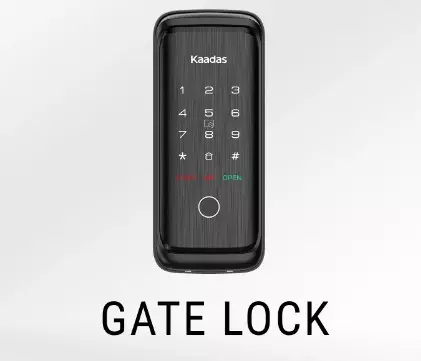
Keypad smart locks require you to input a PIN code to unlock the door. They are best used in a residential environment as they give users an alternative to mechanical keys.
2. Biometric Locks
You can use these locks for access with your fingerprints or any other physical characteristics that are unique to you. User identification is a very important aspect in high security environments and biometric locks are normally found in those environments which need them to keep their sensitive information safe.
3. Bluetooth and Wi-Fi Enabled Locks
These smart locks are controlled via a mobile app on your phone. With Bluetooth enabled locks, the door is automatically unlocked when you are near. Through the internet, Wi-Fi based locks can be controlled from anywhere in the world.
4. Smart Locks with Key Fob Access
Some smart locks allow entry via a key fob, which can be used instead of a traditional key. For multiple users and guests, these are convenient.
How Do Smart Digital Locks Work?
Smart digital locks function through various technologies that communicate with an access control system. Here’s a closer look at the mechanics behind how smart locks operate:
1. Wireless Connectivity
One of the primary features of smart locks is wireless connectivity. Most modern smart locks operate through Bluetooth or Wi-Fi. You connect the lock to your home’s Wi-Fi network, or via Bluetooth to a smartphone, when you install it. After connecting, the lock wirelessly communicates to your device to enable remote control and monitoring.
2. Mobile App Control
With a smart lock, you can control access from your smartphone. Mobile apps are typically linked to the smart lock, giving you the ability to lock and unlock doors from anywhere. Even some apps let you give short term access to other people, making it a great pick for your family, friends and guests.
3. Keypad and Pin Code Access
Many smart locks come equipped with a keypad where users can input a unique PIN code. Without the need of a physical key, access is given. Some even allow users to change the PIN codes to ensure that only authorized personnel are allowed access.
4. Biometric Security
Some smart digital locks use biometric technology to ensure only authorized users can access a building. These locks are confirmed by scanning your fingerprints or other biometric data. This operates in a highly secure environment and provides even higher level of protection.
5. Remote Access and Monitoring
Advanced smart locks also offer features such as remote monitoring, which allows you to see who is coming and going. For instance, you can receive notifications when the door is unlocked so that you will be updated with the real time of status of the security of your property.
Benefits of Smart Digital Locks
1. Enhanced Security
Smart digital locks provide an added layer of security that traditional locks can’t match. Home or business owners can enjoy features which include remote access, biometric verification and allows you to decide who can enter your home or business and when.
2. Convenience
No more fumbling for keys. Smart locks eliminate the need for physical keys, allowing you to lock and unlock doors with your smartphone or a code. This is especially useful for someone who frequently forgets or loses their keys.
3. Easy Management of Access
With a smart lock, you can grant temporary or permanent access to individuals without having to give them a physical key. It also helps you track down entry logs to know who has been entering your home or office at which time.
4. Remote Control and Monitoring
One of the key advantages of smart locks is the ability to control them from anywhere. Wi-Fi enabled locks offer you even the ability to lock or unlock your door while you’re out of town. You may also receive alerts if someone comes in to provide your mind at ease wherever you may be.
5. Integration with Other Smart Devices
Many smart digital locks can be integrated with other smart home devices, such as security cameras, lighting, and alarms. With this integration, your smart devices are more mutually inclusive in its security system and help it work in one step towards the highest security.
How to Install a Smart Digital Lock?
Installing a smart lock is generally a straightforward process. Here’s how it typically works:
- Choose the Right Lock: Select a smart lock that fits your door type and security needs.
- Remove the Old Lock: The first thing to do is to take out the existing lock from your door. The method of this process varies, depending on what type of lock you have.
- Install the Smart Lock: Follow the manufacturer’s instructions to install the new smart lock. Most smart locks are designed to fit into existing door hardware, making the installation easy.
- Connect the Lock to Your App: When the lock is mounted, pair it with your phone app or to your smart home system. By doing this step, you will be able to control the lock from a distance.
- Test the Lock: Check that the locking all methods of access devices (phone app, keypad tabs etc.) work prior to installing them.
All in all, by understanding how smart locks work and the benefits they offer, you can make an informed decision about upgrading your property’s security.