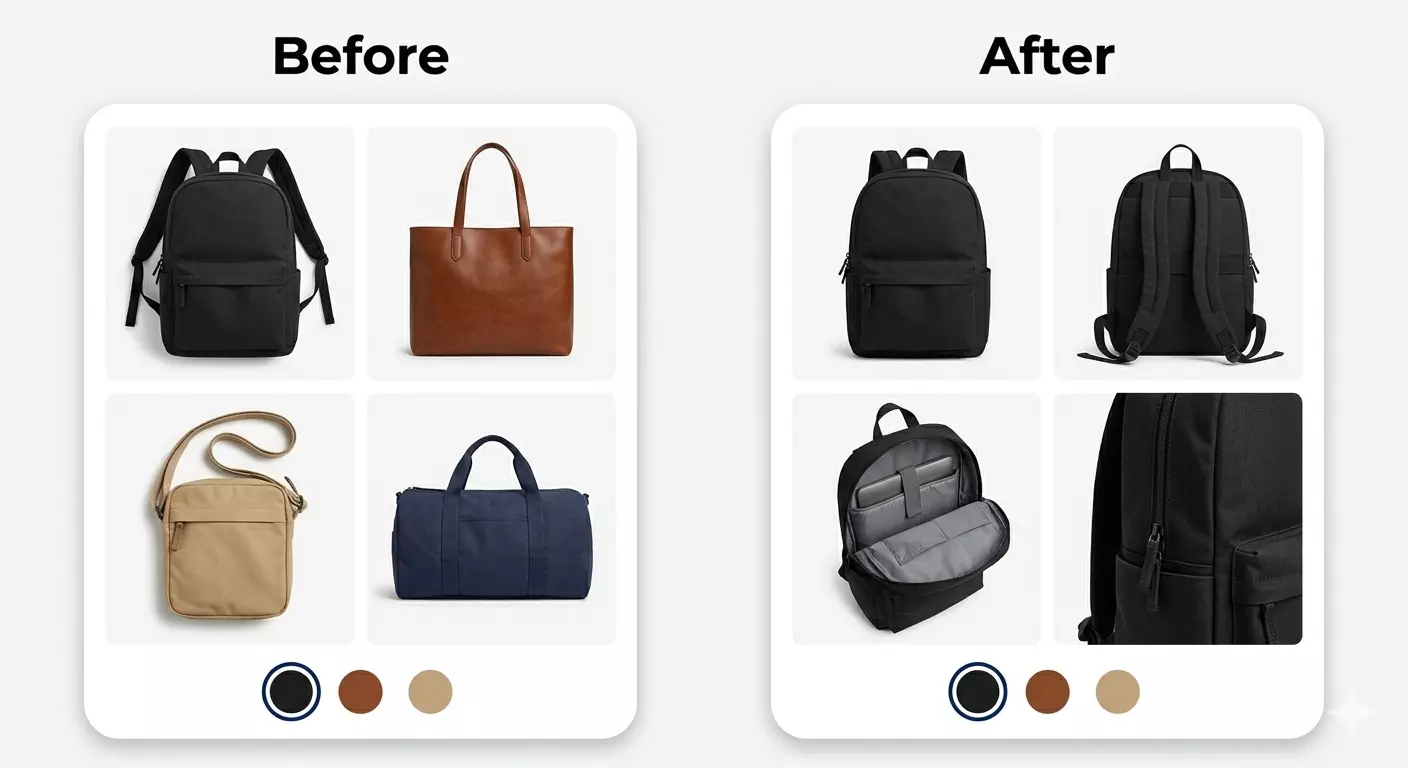
Shopify Multiple Images per Product Strategy Guide
Why Multiple Images Matter in eCommerce
When shopping online, customers rely heavily on visuals. A single product image rarely provides enough information for them to make a confident purchase. Using shopify multiple images per product helps in several ways:
- Builds trust: Clear visuals reduce doubts and increase purchase confidence.
- Showcases product details: Customers can see every feature, color, or size variant.
- Enhances user experience: Shoppers can interact with the product through multiple perspectives.
- Improves conversions: Stores with multiple images per product consistently outperform single-image listings.
By integrating Nova Multiple Variant Images, your Shopify store can automatically associate multiple images with each product variant, giving customers the full experience without manual effort.
Best Practices for Shopify Multiple Images per Product
To get the most out of shopify multiple images per product, follow these expert strategies:
1. Use High-Quality Images
Image quality matters. Crisp, high-resolution images allow customers to zoom in and view product details clearly.
Low-quality images can damage your brand perception. Nova Multiple Variant Images supports large, optimized images without slowing down your store.
2. Showcase Multiple Angles
Displaying products from different angles is crucial. For instance, show front, back, side, and close-up shots. Shopify multiple images per product functionality ensures every angle is accessible to your buyers.
3. Highlight Variants
Customers want to see the exact product they select. Using Nova Multiple Variant Images, you can assign specific images to each variant, like color or size. This eliminates confusion and enhances the shopping experience.
4. Optimize Image Size and Format
Images must load fast. Compress images to reduce size while maintaining quality. JPEGs work well for photographs, while PNGs are best for transparent backgrounds. Fast-loading images improve site speed and SEO.
5. Consistent Background and Lighting
Consistency builds professionalism. Use uniform backgrounds and lighting for all product images. This makes your store look cohesive and visually appealing, encouraging trust and conversions.
Leveraging Apps like Nova Multiple Variant Images
Managing multiple images per product manually can be tedious, especially for stores with hundreds of SKUs. Nova Multiple Variant Images streamlines this process by:
- Automatically linking variant-specific images.
- Enabling image galleries per product variant.
- Simplifying bulk uploads for large catalogs.
This means you can focus on marketing and sales rather than spending hours managing product images.
How Shopify Multiple Images per Product Improves CRO
Conversion Rate Optimization (CRO) is critical for online stores. Here’s how shopify multiple images per product helps:
- Reduces Returns: Clear visuals mean customers get what they expect.
- Boosts Engagement: Interactive galleries keep users browsing longer.
- Encourages Impulse Buys: Seeing multiple angles increases desire to purchase.
By combining Nova Multiple Variant Images with smart product pages, you can maximize your CRO potential.
SEO Benefits of Using Multiple Images
Optimized product images contribute to search engine rankings:
- Alt Text: Describe each image using relevant keywords like “red cotton t-shirt front view.”
- File Names: Use descriptive file names for each image to improve search visibility.
- Page Speed: Properly compressed images ensure your site remains fast, enhancing SEO.
Using shopify multiple images per product allows you to add rich, keyword-optimized visuals that attract organic traffic.
Tips for Creating a Winning Image Strategy
1. Plan Your Image Types
Decide what images are essential: product front, side, back, lifestyle, and close-ups.
2. Test User Behavior
Check which images your customers engage with most. Analytics tools can guide your image strategy.
3. Incorporate Lifestyle Shots
Lifestyle images help customers visualize products in real life. Combine product-only images with real-world scenarios for maximum effect.
4. Maintain Uniformity Across Your Store
Consistency helps users quickly recognize your brand and makes your store appear professional.
5. Keep Updating Images
Trends change, products evolve, and seasonal updates can refresh your product pages. Nova Multiple Variant Images makes updating multiple images easy and fast.
How to Implement Shopify Multiple Images per Product
- Upload Images in Shopify Admin: Navigate to your product pages and upload all relevant images.
- Assign Images to Variants: Using Nova Multiple Variant Images, link each image to its corresponding variant.
- Organize Image Order: Prioritize images to highlight your main selling points first.
- Enable Image Zoom & Gallery: Shopify themes support zooming and gallery sliders, improving user experience.
Following these steps ensures your shopify multiple images per product setup is fully optimized.
Read: Step-by-Step: How Websites Are Planned, Designed, and
Common Mistakes to Avoid
- Too few images: Don’t rely on a single image. Customers need multiple perspectives.
- Low-quality visuals: Blurry or pixelated images can reduce credibility.
- Ignoring variants: Not showing variant-specific images can lead to confusion and returns.
- Slow-loading images: Overly large images harm performance and SEO.
Nova Multiple Variant Images helps prevent these mistakes by automating variant image management and ensuring high-quality visuals.
Conclusion
Implementing shopify multiple images per product with Nova Multiple Variant Images enhances your store’s visuals, improves conversions, and builds customer trust.
By following these strategies, you can create engaging, high-performing product pages that drive sales on Shopify.