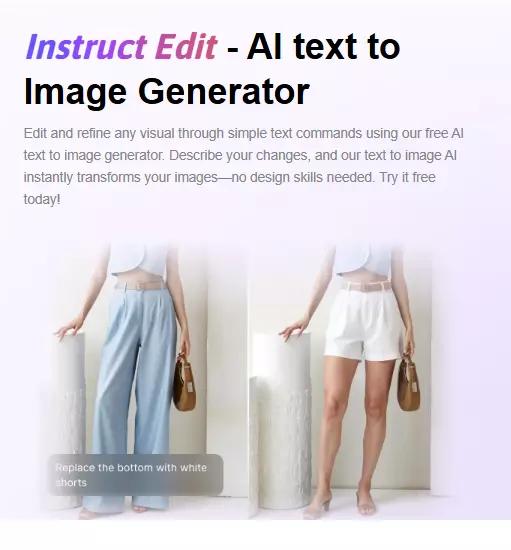
Breaking Down the Technology Behind Instruct Edit - AI Text-to-Image Generators
AI text-to-image generation is transforming the way we create visuals for digital content. Instruct Edit - AI Text-to-Image Generator, a powerful tool available through SellerPic, is revolutionizing visual content creation by leveraging advanced machine learning, natural language processing (NLP), and computer vision to turn written descriptions into high-quality images.
This article will break down the technology behind Instruct Edit - AI Text-to-Image Generator, explain how it works, and explore the impact of this cutting-edge technology on the creative industry.
What is Instruct Edit - AI Text-to-Image Generator?
Instruct Edit is an innovative tool that utilizes the power of AI to convert written text into stunning visual content. With just a simple text prompt, users can create high-quality, customized images that align perfectly with their creative or marketing needs. By integrating NLP and deep learning algorithms, Instruct Edit understands the nuances of language and can generate imagery that reflects the details within the text description.
SellerPic offers Instruct Edit - AI Text-to-Image Generator as part of its suite of AI-powered content creation tools, aimed at helping users generate visual assets with minimal effort and maximum creative freedom.
The Technology Behind Instruct Edit - AI Text-to-Image Generators
Natural Language Processing (NLP) in Image Generation
At the core of Instruct Edit lies Natural Language Processing (NLP), a branch of artificial intelligence that allows the tool to understand and interpret human language.
When a user inputs a text prompt, NLP enables the AI to break down the text into meaningful elements, such as objects, actions, and settings. For example, a description like “a calm mountain lake at sunset” would be processed by the AI to understand that it should generate an image with a peaceful lake, mountains, and a warm sunset.
By using sophisticated NLP algorithms, Instruct Edit can generate images from textual prompts in a way that closely aligns with the user's intent. This technology allows for a high degree of flexibility, making it possible to create anything from realistic landscapes to abstract art, depending on the input text.
Machine Learning Models and Deep Learning Algorithms
Instruct Edit uses advanced machine learning models, specifically deep learning neural networks, to process large datasets and learn patterns between text and images. These models are trained on vast amounts of image-text pairs, allowing the AI to understand how different words correspond to specific visual elements. By doing this, the system becomes better at producing images that match the text descriptions with increasing accuracy over time.
These deep learning algorithms continuously improve as they are exposed to more data, allowing Instruct Edit - AI Text-to-Image Generator to produce high-quality visuals that are more realistic, creative, and aligned with the user's input.
Computer Vision and Image Synthesis
Another critical aspect of Instruct Edit is computer vision, which enables the AI to understand and generate visual content. Computer vision helps the AI interpret the image composition, including elements like shapes, textures, colors, and proportions, to match the written description.
For instance, if the input prompt specifies “a red car driving down a snowy road,” Instruct Edit’s computer vision capabilities allow it to understand how the car should look, the setting of a snowy road, and how to combine these elements into a cohesive, realistic image. This image synthesis capability is what allows the AI to generate diverse visuals that are both accurate and creative.
How Instruct Edit - AI Text-to-Image Generator Impacts Content Creation
Streamlining the Creative Process for Designers
With Instruct Edit, designers no longer need to spend hours manually creating or sourcing images. By simply entering a descriptive prompt, they can generate visuals that fit their creative vision and requirements. This eliminates the need for expensive stock photos or labor-intensive photo editing, significantly speeding up the design process.
Whether for social media posts, website graphics, or marketing campaigns, Instruct Edit - AI Text-to-Image Generator empowers designers to focus on the creative aspects of their work rather than the technicalities of image production.
Enhancing Marketing and Branding with Custom Visuals
For businesses and marketers, AI-powered text-to-image generation opens up new possibilities for creating custom visuals that reflect their brand's personality. Instruct Edit allows businesses to produce high-quality, unique images tailored to specific marketing goals and audience preferences. By using AI-generated images, companies can produce consistent and engaging visual content without relying on generic stock imagery.
With the ability to quickly generate relevant visuals, marketers can test multiple designs and iterations to find the most effective imagery for their campaigns. This ability to create on-demand visuals enhances brand consistency, engagement, and overall marketing success.
How to Use Instruct Edit - AI Text-to-Image Generator for Your Projects
A Step-by-Step Guide to Using Instruct Edit
- Sign Up and Log In: Create an account on SellerPic and log in to access the Instruct Edit tool.
- Input Your Text Prompt: Enter a clear and detailed description of the image you want to generate, such as “a modern office with bright lighting and a sleek desk.”
- Adjust Settings: Customize the image by adjusting settings like style, color scheme, or resolution, depending on your needs.
- Generate Your Image: Click the “generate” button and let Instruct Edit process the description. The AI will quickly produce an image that matches your prompt.
- Download or Share: Once you’re satisfied with the image, you can download it or share it directly for use in your project.
This user-friendly process makes Instruct Edit - AI Text-to-Image Generator accessible for both beginners and experienced professionals alike.
Customizing AI-Generated Images for Different Platforms
In addition to generating visuals from text, Instruct Edit allows you to customize your images for different platforms. Whether it’s resizing images for Instagram, creating banners for Facebook ads, or producing high-quality visuals for your website, Instruct Edit makes it easy to adapt AI-generated images for any format.
The Future of AI Text-to-Image Generation
As AI continues to evolve, so will the capabilities of Instruct Edit. Future advancements in deep learning, NLP, and computer vision will lead to even more accurate and creative image generation. In the near future, we can expect AI-generated visuals to become even more personalized, with the ability to capture even more specific user needs and preferences.
Moreover, as AI technology improves, tools like Instruct Edit will become even more intuitive, providing users with an increasingly seamless experience in generating high-quality visuals for their projects.
Conclusion
Instruct Edit - AI Text-to-Image Generator is a game-changing tool for content creators, designers, and marketers. By combining NLP, machine learning, and computer vision, it enables users to generate high-quality, customized images from simple text prompts. Whether you're a small business owner, a designer, or a digital marketer, Instruct Edit provides an efficient, affordable, and creative solution for generating visuals that align perfectly with your needs.
As AI technology continues to evolve, the future of AI-powered content creation looks promising. Tools like Instruct Edit will continue to empower users to create visually engaging content quickly, efficiently, and creatively, leading to a more dynamic and personalized digital experience.
FAQs About Instruct Edit - AI Text-to-Image Generator
1. What is Instruct Edit?
Instruct Edit is an AI-powered tool that allows users to generate visual content from text descriptions. It uses natural language processing (NLP) and machine learning algorithms to convert written prompts into high-quality images, making it ideal for designers, marketers, and content creators.
2. How does Instruct Edit turn text into images?
Instruct Edit processes the text input by using NLP and deep learning algorithms to interpret the description and match it with visual elements. It then generates an image based on the text’s key components, such as objects, settings, and moods.
3. Can Instruct Edit be used for commercial purposes?
Yes, Instruct Edit allows users to create images for commercial purposes, such as for marketing materials, advertisements, and social media posts. Be sure to review the platform's terms of service for usage rights.
4. How does Instruct Edit save time for designers?
By providing a simple text prompt, Instruct Edit enables designers to create high-quality, customized visuals without spending hours on manual design or searching for stock images. This drastically speeds up the creative process, allowing designers to focus on other tasks.
5. What industries can benefit from Instruct Edit?
Industries such as digital marketing, advertising, e-commerce, graphic design, and social media marketing can benefit from Instruct Edit by generating custom visuals tailored to their specific needs.
6. Can I customize the images generated by Instruct Edit?
Yes, Instruct Edit allows you to customize the generated images by adjusting the style, color scheme, and resolution, making it easy to adapt the visuals to different platforms or design requirements.
7. How accurate is Instruct Edit in interpreting text prompts?
The accuracy of Instruct Edit largely depends on the clarity and detail of the text prompt. The more specific and descriptive the input, the more accurate the AI-generated image will be.
8. Do I need any design skills to use Instruct Edit?
No, Instruct Edit is designed to be user-friendly and accessible to everyone, even those with no design experience. Simply enter a text prompt, and the AI will handle the image generation process.
9. Is Instruct Edit suitable for beginners?
Yes, Instruct Edit is perfect for beginners as it requires no design expertise. The intuitive interface and easy process make it accessible for anyone looking to create high-quality images.
10. How much does Instruct Edit cost?
Instruct Edit offers various pricing plans, with free and premium options depending on the features and image quality you need. Visit the SellerPic website for more details on the available subscription options.