Best Morse Code Translators
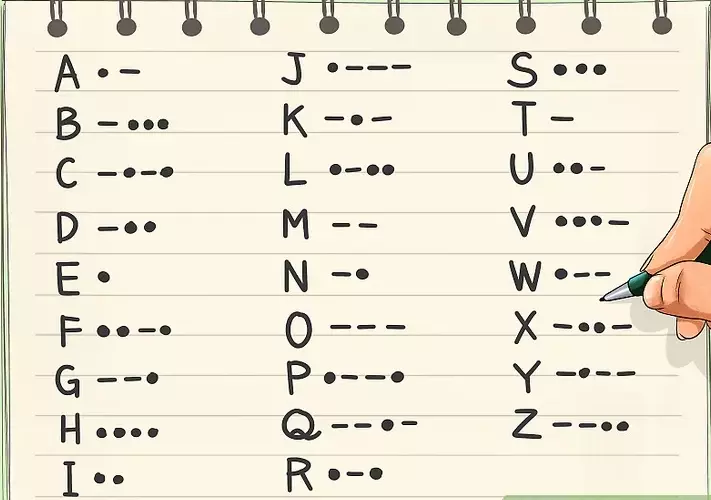
Morse code, a communication method that uses sequences of dots and dashes to represent letters and numbers, continues to captivate enthusiasts, emergency responders, and amateur radio operators alike. Whether you’re learning Morse for fun, communication, or decoding historic messages, having a reliable Morse code translator is essential.
These tools simplify the process by converting text to Morse code and vice versa, often with added features like audio playback, flashing lights, or vibration.
In this article, we’ll explore the best Morse code translators available today—both online and offline—covering their features, usability, pros, cons, and what makes each unique.
1. TextToMorseCode.com
Best for: Beginners, learners, and general users
Overview:
TextToMorseCode.com is a simple yet highly functional web-based Morse code translator. It supports instant conversion between text and Morse code. The tool also allows users to play Morse code sounds, download audio files, trigger device vibration, or watch a blinking light as visual feedback.
Key Features:
- Instant text-to-Morse and Morse-to-text translation
- Audio playback and download
- Vibration and flashlight options (mobile-friendly)
- Multiple examples for learning purposes
Pros:
- Completely free and easy to use
- No registration required
- Educational examples included
Cons:
- No mobile app version
- Limited customization of output
2. Morse Code Translator by MorseCode.World
Best for: Advanced users and hobbyists
Overview:
MorseCode.World offers one of the most comprehensive online translators. It not only converts text to Morse code but also includes options for customizing speed (WPM), tone frequency, and Farnsworth timing, which are important for realistic Morse code practice.
Key Features:
- Adjustable WPM and audio pitch
- Text-to-Morse and Morse-to-text conversion
- International Morse code support
- Audio playback and loop function
Pros:
- Highly customizable for advanced training
- Clean user interface
- Accurate and professional-level tool
Cons:
- Might be overwhelming for casual users
- No mobile app
3. Gboard Morse Code Keyboard (by Google)
Best for: Accessibility and mobile typing
Overview:
Google’s Gboard includes a Morse code keyboard, designed initially to help users with limited mobility. It allows typing in Morse code using a simple dot and dash interface and translates it into regular text in real time.
Key Features:
- Morse input method for Android and iOS
- Instant decoding to text
- Predictive text and suggestions
- Integration with Google Assistant
Pros:
- Excellent for accessibility
- Works with all mobile apps
- Smooth and intuitive interface
Cons:
- No audio playback
- Requires learning Morse input layout
4. Morse Code Agent (Mobile App)
Best for: Offline use and smartphone users
Overview:
Morse Code Agent is a popular mobile app available for Android and iOS. It translates Morse code using sound, light, or camera flashes and even allows users to scan and decode Morse from images or audio.
Key Features:
- Sound and flashlight encoding
- Real-time Morse detection using the microphone
- Text and audio translation
- Camera scan for decoding visual Morse
Pros:
- Works offline
- Multi-modal input and output
- Ideal for field use
Cons:
- Some features require in-app purchases
- The interface may vary between devices
5. Morse Code Translator by Dcode.fr
Best for: Cryptography and puzzle solvers
Overview:
Dcode.fr is a treasure trove for cryptography enthusiasts. Its Morse Code Translator is particularly suited for decoding puzzles, escape rooms, or geocaching clues. It supports multiple Morse variants and advanced decoding methods.
Key Features:
- Morse code analysis and decoding tools
- Support for multiple alphabets and spacing
- Automatic detection and correction
Pros:
- Powerful cryptanalysis features
- Customizable decoding parameters
- Great for puzzle-solving communities
Cons:
- Interface is dated
- Not beginner-friendly
6. Morse Decoder (Web and App)
Best for: Listening and decoding live Morse signals
Overview:
Morse Decoder is built to decode Morse code from live audio using your device’s microphone. It’s perfect for amateur radio (ham) operators who want to decode live CW (continuous wave) transmissions without manual intervention.
Key Features:
- Real-time audio decoding
- Adjustable filters and gain
- Logs decoded output
- Works on PC and mobile
Pros:
- Great for radio operators
- Real-time decoding accuracy
- Lightweight software
Cons:
- Sensitive to background noise
- Limited text encoding features
7. CWCom (Morse Chat Software)
Best for: Real-time Morse communication over the internet
Overview:
CWCom (Chat With Morse) is a Windows application that allows users to communicate using Morse code over the internet. It simulates ham radio communication and is widely used by enthusiasts to practice and chat in real time.
Key Features:
- Morse chat over the internet
- QSO logging and monitoring
- Keyboard and paddle input supported
Pros:
- Simulates real-world CW practice
- Active global user community
- Perfect for Morse pros and learners
Cons:
- Only available for Windows
- Requires setup and technical knowledge
Final Thoughts
Morse code may be an old technology, but it continues to thrive in modern digital tools and applications. Whether you’re a beginner looking for a simple translator or an expert training for ham radio communication, the tools listed above offer something for everyone.
To choose the best Morse code translator, consider the following:
- Do you want sound playback or real-time audio decoding?
- Are you learning Morse or using it for actual communication?
- Do you need an offline option or a mobile app?
- Do you need advanced features like speed customization?
From intuitive web tools like TextToMorseCode.com to professional-level decoders like MorseCode.World, there’s a tool for every use case. Try a few and find the one that best suits your learning style or communication needs.
Frequently Asked Questions
Q: Are Morse code translators accurate?
Yes, most online and app-based Morse code translators use standard International Morse code and offer accurate translations. For precise decoding, choose tools with adjustable settings.
Q: Can Morse code translators be used offline?
Yes. Apps like Morse Code Agent or CWCom offer offline functionality, making them ideal for field use or situations without internet access.
Q: Can these tools help me learn Morse code?
Definitely. Many tools include educational features, playback options, and examples to help users learn and practice Morse code efficiently.