7Z Password Recovery Software: A Reliable Solution to Recover Forgotten 7-Zip Archive Passwords
Compressed archive files are widely used to store, organize, and securely share large amounts of data. Among the most popular archive formats, 7Z stands out for its high compression ratio and strong AES-256 encryption.
While password protection significantly enhances data security, forgetting the password can make important files inaccessible. In such situations, 7Z Password Recovery Software provides an efficient way to recover or unlock password-protected 7Z archives.
This article explores the importance of 7Z Password Recovery Software, its key features, benefits, recovery methods, and best practices for safely regaining access to encrypted archives.
What is 7Z Password Recovery Software?
7Z Password Recovery Software is a specialized utility designed to recover or identify the password for encrypted 7Z archive files when the authorized user has forgotten it.
These tools use advanced password recovery techniques to help regain access to files while preserving the integrity of the archive.
Professional recovery software supports encrypted archives created with 7-Zip and is intended for legitimate password recovery, data restoration, and business continuity purposes.
Why Password Recovery is Necessary
Password protection prevents unauthorized access to sensitive files. However, legitimate users may lose access due to several reasons, including:
- Forgotten archive passwords
- Long periods without using the archive
- Employee turnover in organizations
- Missing password documentation
- Recovery of archived backup files
- Legacy archives created years ago
When no password record exists, password recovery software can help recover access without modifying the original archive.
Understanding 7Z Encryption
The 7Z archive format uses AES-256 encryption, one of the strongest encryption standards available today. This encryption secures both file contents and, when enabled, file names within the archive.
Because of its robust encryption, there is no universal "master password" or shortcut to unlock a protected 7Z file. Passwrd recovery software works by systematically testing possible passwords using different recovery strategies until the correct one is found.
Common Password Recovery Methods
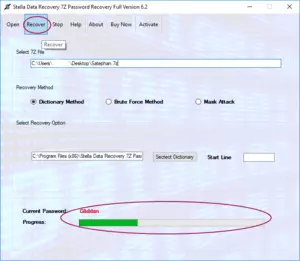
Professional 7Z Password Recovery Software typically offers several recovery modes.
Brute Force Attack
A brute force attack tests every possible password combination until the correct password is discovered.
Best suited for:
- Short passwords
- Numeric passwords
- Unknown password patterns
Although highly reliable, recovery time increases significantly with longer and more complex passwords.
Dictionary Attack
Dictionary recovery uses predefined wordlists containing common passwords, phrases, names, and frequently used combinations.
Ideal for:
- Simple passwords
- Common words
- Frequently reused passwords
This method is often much faster than brute force when the password is based on recognizable words.
Mask Attack
Mask recovery allows users to define known portions of the password.
Examples include:
- Starting characters
- Ending digits
- Password length
- Character types
If you remember part of the password, this method can significantly reduce recovery time.
Smart Recovery
Many advanced tools combine multiple recovery strategies and automatically switch between them to improve efficiency.
Key Features of Professional 7Z Password Recovery Software
A reliable recovery solution offers features that improve performance, flexibility, and usability.
Support for All 7Z Archive Versions
Professional tools support archives created with both older and newer versions of 7-Zip.
Advanced Recovery Algorithms
Optimized recovery engines intelligently test password combinations to maximize efficiency while maintaining data integrity.
GPU Acceleration
Many enterprise-grade solutions utilize NVIDIA CUDA or AMD GPU acceleration to process millions of password combinations per second, significantly reducing recovery time.
Multi-Core CPU Support
Modern recovery software fully utilizes multi-core processors for faster password analysis.
Resume Recovery
Recovery sessions can be paused and resumed later without losing progress, which is especially useful for lengthy recovery tasks.
Automatic Progress Saving
If the system unexpectedly shuts down, the software can continue from the last saved recovery point.
User-Friendly Interface
An intuitive graphical interface allows both technical and non-technical users to configure recovery settings with ease.
Custom Character Sets
Users can specify custom character combinations, including:
- Uppercase letters
- Lowercase letters
- Numbers
- Symbols
- Unicode characters
This improves recovery efficiency when password composition is partially known.
Read: SlideShare Downloader – Download Any Presentation Free in
Benefits of Using 7Z Password Recovery Software
Professional recovery software provides several practical advantages.
Recover Access to Important Files
The primary benefit is restoring access to valuable business or personal data stored within encrypted archives.
Preserve Archive Integrity
Recovery tools work without altering the original 7Z file, ensuring that recovered data remains intact.
Save Time
Automated recovery methods eliminate the need for manual password guessing, which is often impractical.
Improve Business Continuity
Organizations can recover archived project files, financial documents, contracts, and backups, minimizing disruption caused by forgotten passwords.
Support Large Archives
Professional tools can recover passwords for both small and very large encrypted archives without affecting file integrity.
Typical Password Recovery Process
Using 7Z Password Recovery Software is generally straightforward.
Step 1: Select the Protected Archive
Open the software and choose the encrypted 7Z file.
Step 2: Choose a Recovery Mode
Select the appropriate recovery method based on the information available, such as brute force, dictionary, or mask attack.
Step 3: Configure Recovery Settings
Set options such as:
- Password length
- Character types
- Known prefixes or suffixes
- Dictionary file (if applicable)
Step 4: Start Recovery
The software begins testing password combinations while displaying real-time progress.
Step 5: Recover the Password
Once the correct password is identified, use it to unlock the archive with 7-Zip or another compatible archive manager.
Important Features to Consider
When selecting a 7Z Password Recovery solution, look for the following capabilities:
- Support for all 7Z archive versions
- AES-256 encrypted archive compatibility
- Brute force, dictionary, and mask attack modes
- GPU acceleration
- Multi-core CPU optimization
- Resume interrupted recovery sessions
- Automatic progress saving
- Large archive support
- Custom character sets
- Detailed recovery reports
- Intuitive user interface
- Regular software updates
Best Practices for Successful Password Recovery
To improve recovery efficiency:
- Use only on archives you own or are authorized to access.
- If you remember any part of the password, use mask recovery to reduce search time.
- Try dictionary recovery before brute force for common passwords.
- Keep the computer powered during lengthy recovery sessions.
- Save recovery progress whenever the software supports checkpointing.
- Store recovered passwords securely using a trusted password manager to avoid future lockouts.
Common Business Applications
7Z Password Recovery Software is useful across many industries.
- Corporate IT: Recover passwords for archived project files and backups.
- Legal Firms: Regain access to encrypted case documents.
- Healthcare: Restore access to protected medical archives while maintaining compliance.
- Educational Institutions: Recover password-protected research and administrative archives.
- Financial Organizations: Access encrypted financial reports and historical records.
Conclusion
Password-protected 7Z archives provide strong security for sensitive information, but forgotten passwords can prevent legitimate users from accessing important files.
7Z Password Recovery Software offers a dependable solution for recovering access through advanced recovery techniques such as brute force, dictionary, and mask attacks, while preserving the integrity of the original archive.
With features like GPU acceleration, multi-core processing, resume functionality, support for modern 7Z encryption, and an intuitive interface, professional recovery tools help individuals and organizations efficiently restore access to valuable data.
Whether you need to recover business archives, personal backups, or legacy compressed files, a reliable 7Z Password Recovery Software solution is an essential tool for secure and effective password recovery.